EPIC


Crowdin
Review Only the Translations That Need It.
Add TAUS EPIC QE and APE steps to your Crowdin Enterprise workflows. Score every pre-translated string, approve the ones that meet your threshold, fix the rest automatically, and send only what’s left to your reviewers.
Your content moves fast.
Your translation review shouldn't slow it down.
Product UI, websites, help centers, and marketing content change constantly. But sending 100% of your machine-translated strings to human proofreaders creates a massive bottleneck. You are likely experiencing:
Slow Time-to-Market
Waiting for human linguists to review perfect machine translations delays your product, website, and content updates.
Wasted Budget
You are paying proofreaders to review strings that are actually already good enough to publish.
Workflow Disconnects
Managing quality estimation outside of your established Crowdin environment breaks your continuous delivery cycle.
TAUS EPIC QE & APE for Crowdin

Instant Quality Estimation (QE)

Instant Quality Estimation (QE)
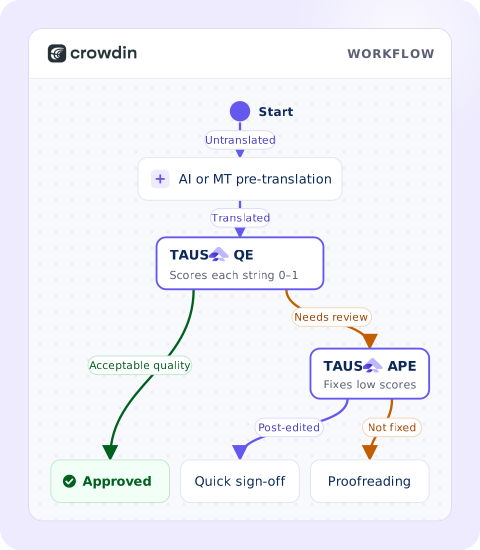
When strings are pre-translated – by AI, your machine translation engines, or even your translation memory – they are automatically sent to the TAUS QE Agent. The agent evaluates the translation without needing a human reference and assigns a quality score from 0 to 1.
0.92
String scored
0.64
String scored

Automated Approval (The Quality Gate)


Automatic Post-Editing (APE) for Risky Strings

See It in Action: An Example Crowdin Workflow
Because Crowdin workflows are built from configurable steps, you can place TAUS exactly where it fits your process – no custom code required.
01
Sync
New or updated content arrives in Crowdin from your repository, CMS, or any connected source, and the workflow starts automatically.
02
Reuse
Crowdin pre-translates what it can from your translation memory. A TAUS  QE step can check these matches too, so outdated TM records don’t slip through.
03
Translate
Remaining strings are pre-translated by the AI model or MT engine you choose, with a fallback to another engine or a human translator.
04
Evaluate and fix
The TAUS APE step scores each string, post-edits those below your threshold, and keeps an edit only if it improves the score.
05
Approve or review
Strings that pass are approved automatically. The rest go to your proofreaders – your in-house team or a translation agency working in Crowdin.
06
Deliver
Approved translations sync back to your repository or CMS automatically.
Watch It Run: TAUS EPIC in Crowdin
See the full setup in our joint webinar – from installing the app in the Crowdin Store to building a workflow and reviewing what TAUS approved.
93%
In a demo project with a sample Android XML file, the TAUS agent successfully evaluated and automatically approved 93% of the translated words. This reduced the manual human proofreading workload from 100% of the file down to just 7%.
What It Looks Like In Practice
Instead of reviewing every string, your human proofreaders only spend their valuable time on the most complex or risky segments. And you stay in control: you can filter the strings TAUS approved in the Crowdin Editor, check each string’s history, and see every action the agent took in the project activity log.



Ready to Speed Up Your Localization Cycles?
Fill out the form below to get started, and we'll reach out to schedule a brief discovery call.